Buzz Cut Filter: See Yourself With a Buzz Cut First
Thinking about shaving it all off? This free buzz cut filter shows you exactly how you would look with a clean buzz cut — before anyone touches the clippers. Upload a photo and the AI buzz cut filter renders realistic clipper-short texture, your natural hairline, and your own lighting. Try it in any color, download the preview, and let the buzz cut filter take the guesswork out of the boldest haircut decision you will ever make. No sign-up, no app — the buzz cut filter runs right here in your browser.
Drag and drop your image here, or click to select
Supported formats: JPG, PNG, WEBP
Customize Your Hair Color
 buzz cut
Example: Buzz Cut · Natural Black
Upload your photo to see it on yourself
Buzz Cut Filter Results
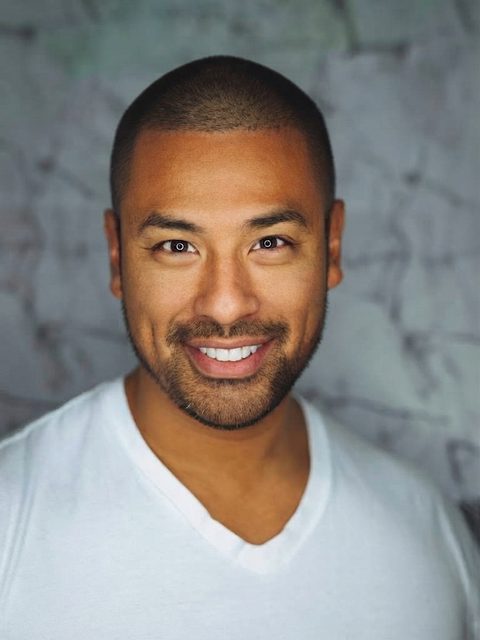
Every preview below was made by this buzz cut filter from a single uploaded photo — no studio, no styling, no retouching. The buzz cut is added with realistic texture and a natural hairline while your face, lighting, and background stay untouched, so what the buzz cut filter shows is genuinely how the cut would frame your features.

From Daily Styling to Zero Maintenance
Even a neat short cut needs product and a mirror every morning. This buzz cut filter preview shows how the buzz skips all of that — it opens up the face, sharpens the jawline, and keeps the natural hairline and beard line intact. If the buzz cut filter version of you looks this put-together with zero effort, imagine the mornings you get back.
- Natural hairline preserved — no helmet look
- Realistic clipper texture and scalp shading


A Clean Slate for Thinning or Fine Hair
If your hair is fine or starting to thin, a buzz cut often looks fuller than longer styles. The buzz cut filter lets you weigh that honestly before committing — and most people find the after photo looks younger and more confident. It is the lowest-risk way to answer a question mirrors cannot.
- See density and head shape before the first snip
- Regenerate in different colors to compare the vibe


Works on Coily and Afro-Textured Hair
Buzz cuts on coily hair have their own character — tight, even, and bold. The buzz cut filter understands curl patterns and renders the texture authentically instead of smoothing it away. Use the buzz cut filter to check the shape from every angle before the clippers come out.
- Authentic texture for 3A–4C hair types
- Preview it in any color before you commit
Why People Use a Buzz Cut Filter
Decide Before the Barber
A buzz cut takes months to grow back. Run your photo through the buzz cut filter first, and walk into the barbershop already knowing the answer.
Thinning Hair Reset
When hair gets fine or the hairline retreats, a buzz cut often looks fuller than a longer style. The buzz cut filter lets you judge that trade-off honestly.
Join the Trend
The #BuzzCutFilter look is all over TikTok and Instagram. Make your own before-and-after with a buzz cut filter that looks real instead of gimmicky.
Show Your Barber
Bring the buzz cut filter preview to your appointment. It is the easiest way to agree on guard length, hairline shape, and finish before the first pass.
Try Buzz Cut Colors
Platinum, copper, jet black, natural — this buzz cut filter recolors as well as it cuts, so you can test a bold shade with zero bleach.
For Women Too
Thinking about the big chop? A buzz cut filter preview shows how the style frames your face before you commit to the clippers.
How the Buzz Cut Filter Works
Upload Your Photo
Drop a clear, front-facing photo into the buzz cut filter — a phone selfie in good light works perfectly.
Pick a Color
The buzz cut is locked in for this page — just tap a color swatch or any custom shade.
Generate and Download
The buzz cut filter returns your preview in about a minute. Download it to show your barber or share with friends.
Will a Buzz Cut Suit Your Face Shape?
Barbers agree on the basics below — but faces are individual. Use the guide to narrow it down, then let the buzz cut filter settle it on your actual face.
Oval
Nearly every buzz cut works — balanced proportions carry the style easily.
Square
A classic match. The buzz cut highlights a strong jawline.
Round
Ask for a skin fade on the sides to add angles and length up top.
Diamond
A fade buzz cut shows off cheekbones and evens out proportions.
Heart
Shorter sides balance a wider forehead and narrower chin.
Oblong
A slightly longer guard (#3–#4) keeps the face from looking longer.
Buzz Cut Lengths: Guard Numbers, Explained
When you bring your buzz cut filter preview to the barber, you will talk in clipper guard numbers. A #1 guard leaves about 1/8 inch of hair — the shortest classic setting, sometimes called an induction cut. A #2 leaves 1/4 inch (a burr cut), while #3 and #4 leave 3/8 to 1/2 inch (a butch) with a little more texture on top. Add a skin fade on the sides and the same cut reads sharper and more modern. The buzz cut filter shows you the overall look; these numbers are how you ask for it in the chair.
Not sure which length suits you? Generate a preview with the buzz cut filter, save the photo, and let your barber match it.
Buzz Cut Filter FAQ
Is the buzz cut filter free?
Yes. New users get free credits — enough for your first buzz cut filter preview at no cost, with no app install. Credit packs and subscriptions are there if you want more colors and styles later.
How realistic is the buzz cut filter?
The buzz cut filter keeps your face, lighting, and background exactly as they are, and rebuilds only the hair with clipper-short texture and your natural hairline — no helmet look, no hard cutout edges.
What photo works best?
A clear, front-facing photo in good light, with your hairline visible. A phone selfie works fine. Heavy shadows, hats, or hair covering the forehead make the buzz cut filter less accurate.
Will a buzz cut suit my face shape?
Oval and square faces suit almost every buzz cut; round faces usually look best with a fade. But faces vary — the reliable way to know is to see it, which is exactly what the buzz cut filter is for.
Can I choose the guard length or color?
On this page the cut is locked to a classic buzz cut. Color is fully open: pick any swatch or custom shade, and the buzz cut filter renders the same cut in that color.
Does it work for women or curly hair?
Yes. The buzz cut filter handles straight, wavy, and coily (3A–4C) textures, and works for any gender — it renders authentic texture instead of smoothing curls away.
Can I download and share the result?
Yes. Download the buzz cut filter preview to show your barber, send to friends for a vote, or post your own before-and-after.
Ready? Run Your Photo Through the Buzz Cut Filter
One upload, about a minute, zero regret. The buzz cut filter shows you the after photo before the first snip.
Try the Buzz Cut Filter Free